
Installation guide
How to install your ASCENDO products
Before you begin: We recommend backing up your NinjaTrader 8 configuration before installing any new software. This ensures you can restore your setup if anything goes wrong. See our guide: Backing up NinjaTrader 8.
Step 1: Install the License Manager
The ASCENDO License Manager validates your product licenses and must be installed before using any ASCENDO products.
Note: If you’ve already installed the License Manager, skip to Step 2.
- Otherwise, follow these instructions to install it.
Step 2: Download the product
- Sign in to your customer area
- Navigate to My account → My downloads
- Download the zip file for the product you want to install
- Note the location where you saved the file
Step 3: Import the product
- Open the NinjaTrader Control Center window
- Select Tools → Import → NinjaScript Add-On…
- In the Import File Explorer window, navigate to where you saved the zip file
- Select the product zip file and click Open
Step 4: Confirm installation prompts
You will see one or more security confirmation windows depending on the product:
Basic prompt (appears for all products): Reminds you to only install add-ons from trusted sources.

- Click OK to proceed with the installation
For some products, you will see these additional warning windows.
Additional prompts (appear for some products):
First prompt: Confirms that this NinjaScript assembly will run automatically when you start NinjaTrader.
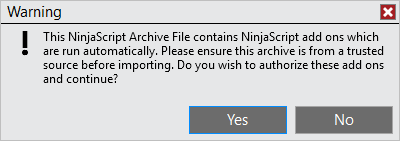
- Click Yes to continue
Second prompt: Another reminder to only install add-ons from trusted sources.

- Click Yes to continue
Step 5: Confirm successful installation
A window will appear confirming successful installation.

- Click OK
- Restart NinjaTrader if prompted to complete the installation
Step 6: Access your product
Important: ASCENDO products are installed as either drawing tools or indicators. Make sure you’re looking in the correct location.
Not sure which type your product is?
- Check the zip file name you downloaded – it begins with either “Drawing Tool -” or “Indicator -“
If your product is a drawing tool:
- Open a chart window
- Access the Drawing Tools menu from the toolbar, or by right-clicking on the chart
- Find and select your product from the list
If your product is an indicator:
- Open a chart window
- Access the Indicators menu from the toolbar or from a right click on the chart
- Find and select your product from the list